Welcome to this week's edition of our RHS Weekly News! We're excited to share the latest happenings and updates from our school community to keep you informed and engaged. There are so many resources in here - please make sure to check it out!
Principal's Message
Dear RHS Families:
We’re already into Week 3, and our Panthers are settling into the rhythm of a new school year! From new routines and new challenges to reconnecting with friends and teachers, the year is off to a great start. This is the time of year when grit matters. It means sticking with something when it’s difficult, learning from mistakes and continuing to move forward. Thank you for partnering with us and encouraging your student to show up, work hard and keep going. We’re excited about what this year has in store!
Next week is Homecoming Week! Scroll down to see what the dress-up days are and what to expect for this awesome week!
Our newsletter includes important information, so please take some time to check it out!
Have a wonderful weekend, Panthers!
Audrey Haugan, Principal
Family HUB
This is an outstanding resource for our families, where you find almost anything you need, right on this link! Bell schedules, calendars, technology resources, nutrition services, school safety information, and more!
September 26 & Oct. 3: Senior Parking Space Painting, 10:00-4:00
September 30: Noise Parade/Power Tuff Game
October 3: Homecoming Dance in the gym, 8:00-10:00
October 6: Perfect Attendance Party
October 9: No School- State Inservice Day
Home Athletic Events
9/28 Monday: Volleyball vs. Summit, JV/JV2 @5PM, Varsity @6:30
9/28 Monday: Boys Soccer vs. RVHS, JV2/Frosh @4PM
9/29 Tuesday: Boys Soccer vs. Mt. View, JV @3, Varsity @4:30PM
9/30 Wednesday: Boys Soccer vs. Sisters, JV2/Frosh @4PM
10/1 Thursday: Boys Soccer vs. Summit, JV @4:30PM, Varsity @6PM
10/2 Friday: Football vs. Caldera (Homecoming), Varsity @7:00PM
Upcoming College/Career Events for RHS students
Monday, September 28th at 12:30pm: Reed College presentation in Portable #8. Fill out the Interest Form to participate
Tuesday, September 29th at 9:00am: Christian College Fair at Central Christian School. Fill out the Interest Form and Register Here to participate
Tuesday, September 29th at 1:30pm: Seattle Pacific University presentation in Portable #8. Fill out the Interest Form to participate
You must be passing your classes to participate in these events! Contact Ms. Meinig in P3 for more information.
Important Information for Seniors
Here are some tasks to start off your year!
Task #1: This will take you to The Class of 2027 Critical Dates Calendar. Review the important dates and mark your calendar. Bookmark this document so that you can refer back to it.
Task #2: This will take you to the Redmond High School Scholarships Page.Most scholarships do not open until the new year, however you can still start applying now! Take a look at the Search Sites tab at the bottom to see other places you can go to look for scholarships. Bookmark this document so that you can refer back to it.
Task #3:FAFSA is officially open! Get ready to fill out your FAFSA Application. Here are some resources below:
The following students have been recognized by staff for exemplary demonstrations of the core values of Panther PRIDE (Participation, Relationships, Integrity, Determination, Excellence).
Check out the information below for everything you need to know about Homecoming week!
New Bell Schedules
Congratulations Shawn Treihaft!
Redmond High School Panther Tech is incredibly proud to celebrate Shawn Treihaft, who today became only the second student in Redmond High School history to successfully pass the Certified SOLIDWORKS Expert (CSWE) Certification Exam!
Even more impressive—Shawn is only a junior! That makes him the youngest student in RHS history to earn this certification.
The CSWE is a challenging, industry-recognized certification that demonstrates a high level of skill and understanding in SOLIDWORKS 3D modeling, design, and engineering workflows. Shawn's achievement represents countless hours of practice, problem-solving, attention to detail, and a willingness to push himself beyond the standard expectations of a high school CAD course.
Shawn has set an incredible example of what is possible when students take ownership of their learning and challenge themselves to reach the next level.
Congratulations, Shawn! Your hard work, dedication, and determination have paid off. Panther Tech is proud of you!
Only a junior… and already a Certified SOLIDWORKS Expert!
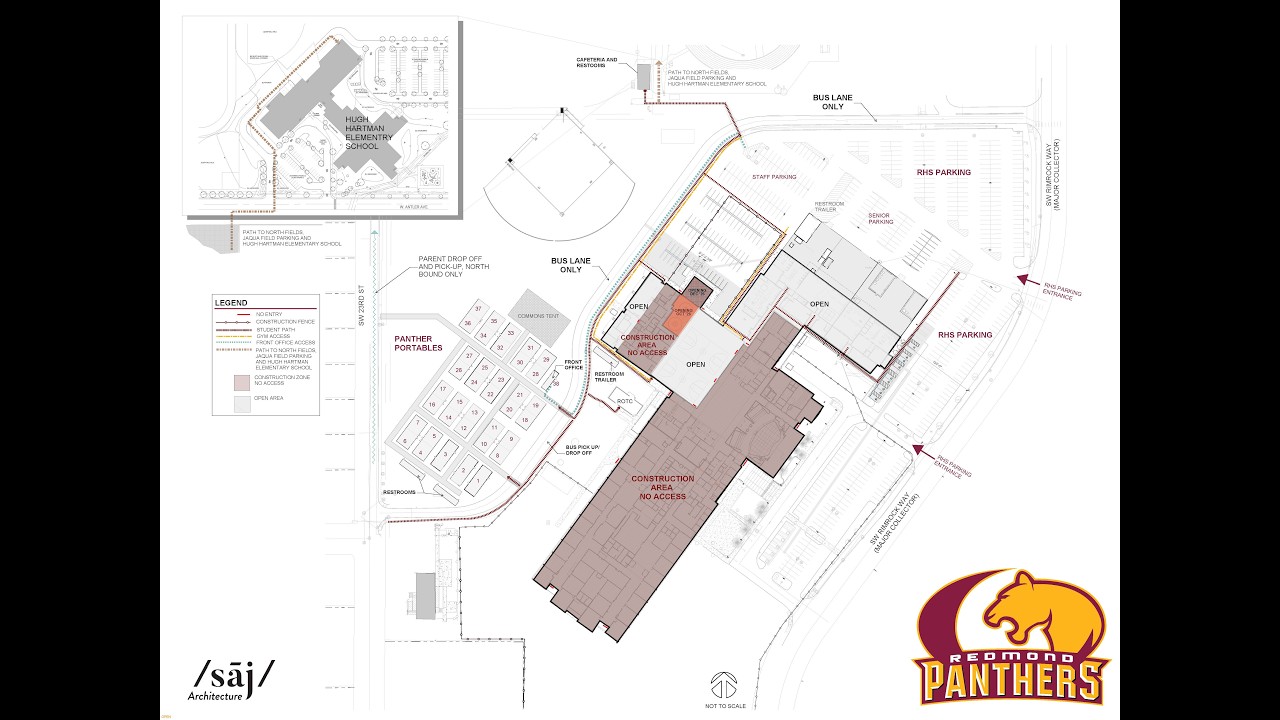
Getting Around the Campus
School Maps
Absences/Tardies
Per state law, absences can only be excused for the following reasons: illness, educational/occupational interviews, quarantine, bereavement or serious illness in the family, inclement weather, religious instruction or emergencies. Absences will only be excused if the school is notified the day before the absence, the day of the absence, or the day that the student returns to school. You must give a reason for an absence. Note: Vacations are not considered an excused absence.
Checking In and Checking Out- When it is necessary for students to leave campus during the school day, they must present a note from the parent to the Attendance Office requesting the release from classes or a parent/guardian can call in. These check out requests are to be made before the absence. Failure to check out will be treated as an unexcused absence (skipping school). Students must check out AND check in to avoid being marked absent or tardy. Check-ins and Check-Outs will be in the Front Office - Portable #38.
Attendance Office Number: 541-923-4805.
IMPORTANT NOTE:
Extracurricular Participation and Social Events- Participation in extracurricular school events (e.g. school dances, prom, rooter/fan buses, field trips, clubs, etc.) is a privilege and an important part of the high school experience. In order to attend such events, the following must occur – Students must have 85% attendance each trimester, no more than 10 tardies per trimester and no major behavior incidents. Students may file an appeal with the Dean, should there be extenuating circumstances.
In accordance with Governor's Executive Order 25-09, Redmond School District (RSD) prohibits the use of personal electronic devices during regular instructional hours. This "bell to bell" policy ensures a focused learning environment while minimizing classroom disruptions.
Educational Purpose
This policy supports our commitment to:
Creating distraction-free learning environments
Promoting face-to-face social interaction
Developing healthy technology habits
Ensuring equal access to learning opportunities
Maintaining school safety and security
Implementation
This policy takes effect at the beginning of the 2025-26 school year. Information will be shared in Student Handbooks, in Parent and Student Vue, and on school websites.
Covered Devices
This policy applies to all personal electronic devices including:
Cell phones and smartphones
Smartwatches and fitness trackers
Smart glasses and AR/VR devices
Bluetooth earbuds and wireless headphones
Tablets and personal iPads
Gaming devices and handheld consoles
Portable music players
Cameras and recording devices
Any other internet-connected personal device
Bell-to-Bell Prohibition
When devices are prohibited: Personal electronic devices may not be used from the start of regular instructional hours until the end of the school day. This includes 7:30-2:20 (M-T-TH-F) and 7:30-1:20 (W). This also includes passing periods and on-campus lunch.
Required storage: All personal electronic devices must be:
Turned off or placed in silent mode.
Stored securely in backpacks, lockers, fanny packs, or designated classroom storage areas.
Cannot be stored on a person, i.e, pockets, etc.
Kept out of sight during instructional hours.
Teachers may require students to leave personal items such as backpacks or fanny packs/purses in a designated spot in the classroom where students can only access with permission once class has started and then at the end of class.
Student Technology Access
Students have access to district-issued Chromebooks for all educational technology needs, including:
Safe internet access for research and learning
Productivity tools and applications
School email for academic communication
Digital learning platforms and resources
Emergency Communication
For parents/guardians: If you need to contact your student during school hours, please call the school's main office. Our staff will ensure urgent messages reach your student promptly.
For students: In case of emergency, students should notify a teacher or staff member who will facilitate necessary communication.
Consequences for Violations
RSD is committed to maintaining instructional time. Consequences for policy violations are designed to be educational rather than punitive and will not result in students losing class time. If a student violates the policy but with another student’s electronic device, the same process and consequences apply to the student.
Student Handbook
Our Student Handbook can be found on this link. This includes all of our school rules, consequences, guidelines, etc. Check it out!
Schedule changes will only be considered if a mistake was made in scheduling. Dropping classes because a student "changed their mind" or "doesn't want a specific teacher" will not be considered. We will consider all extenuating circumstances. Please reach out to your counselor! If you have a mistake on your schedule, use this QR code for a link to a Google Form. Your counselor will review and call you in to discuss.
Parent Square Access
We use Parent Square to communicate to our families. Please make sure you have downloaded the app and signed up for important information from RHS throughout the year!
Here are some technology resources and what they do at RHS:
CANVAS: Students use this every day for their classes. You can find the daily agenda, course syllabus, assignments, grades, and feedback. It shows what work is missing and what has been turned in. To learn more about Canvas and to set up an account, follow these steps: Canvas. Once you have an account, you can log in here: Canvas Parent Login. Note: Canvas will also show student grades, but ParentVue is what we use for athletic eligibility, progress reports and report cards.
ParentVUE and Student VUE: You can use this to see updated grades, daily attendance and tardies. You can check this 24/7, and it has the official grades for the trimester. To have access to official grades, follow these steps: ParentVUE Access. Students have this link in the bookmarks on their computers. You can download the app as well. See directions above.
ParentSquare/StudentSquare: This is our email system for attendance notifications and another other news from the school. Administrators, teachers and coaches all use this to communicate with families. Once you are enrolled at RHS, your enrollment into ParentSquare is automatic and you should be getting email notifications from us.
Call us at 923-4800 if you are having trouble. We can help!
This is an excellent resource for all of you. This app is a resource and tool for any youth needing support for themselves or a friend (includes easy links for Youth Line, Safe Oregon, 988, Lines for Life as well as tons of other useful resources). https://www.firststeporegon.org/
Redmond School District is committed to equal opportunity and non-discrimination in all of its educational and employment activities.
The District does not discriminate on the basis of race, color, national origin, sex, sexual orientation, religion, disability, age, immigration status or citizenship status in its programs and activities and provides equal access to the Boy Scouts and other designated youth groups.
The following individuals have been designated to handle inquiries regarding non-discrimination:
District 504 Contact:
Tami Nakamura, Executive Director of Student Services | Email | (541) 923-8258
District Title VI, Title IX, Age Discrimination & American Disabilities Act Contact:
Kelly Hicks, Director of Human Resources | Email | (541) 923-8922
Heather Petersen, Assistant Director of Human Resources/DEI Specialist | Email | (541) 923-8924